

Yes, e-signing structural calculation reports is acceptable in most U.S. jurisdictions, provided you use a verifiable digital-signature method and include the required seal, license number, and signing date. Standards vary by authority having jurisdiction (AHJ), with agencies like California's Division of the State Architect and Miami-Dade County publishing their own cover-sheet and file-format rules. The PDF reports are built to fit directly into typical signing workflows.
TL;DR:
- Most U.S. jurisdictions accept electronic signatures on structural reports if they use a verifiable digital signature and include the professional's seal, license number, and signing date.
- Jurisdictions like California and Miami-Dade have distinct requirements, with California needing the seal on the cover sheet and Miami-Dade requiring signatures on all sheets or a signed index.
- Verifiable digital signatures rely on third-party certificate authorities, offering cryptographic security and the ability for reviewers to authenticate the signer long after signing.
- Signatures should be applied on the cover or index page, and converting reports to PDF/A is recommended for long-term retention and audit purposes.
- Build your signing workflow around jurisdiction-specific rules and organizational controls to prevent rework and ensure acceptance by plan check authorities.
Table of Contents
- What Are the Rules for E-Signing Structural Calculations by State?
- What Must Appear on a Signed Calculation Report?
- Digital Signature or Electronic Signature: What's the Difference?
- How Do You Build a Permit-Ready E-Signed Calculation Package?
- What Tools and Credentials Do You Need to E-Sign Calculations?
- Should You Convert Structural Calculations to PDF/A Before Signing?
- How Do California DSA and Miami-Dade Handle E-Signed Calculations?
- A Practitioner's Take on E-Signing Structural Work
- A Workflow That Fits Your E-Signing Process
- Sources
- FAQ
What Are the Rules for E-Signing Structural Calculations by State?
There is no single federal rule governing electronic structural calculation submittals. Each AHJ, whether a state agency, county building department, or local plan-check office, sets its own acceptance criteria, which vary significantly among jurisdictions.
Some patterns hold across the country. Most AHJs now accept certificate-based digital signatures on structural calculation reports, following a broader shift toward digital plan review documented in trade coverage of electronic plan submissions. Where jurisdictions diverge is on file structure: some accept a single signed cover page for an entire calculation package, while others require a signature on every sheet.
Two examples show the range you'll encounter:
- California's Division of the State Architect requires the stamp, signature, date, and license number to appear on the cover sheet of structural calculation reports under IR A-19.
- Miami-Dade County requires electronic signing for all electronic submissions and rejects scanned copies of signed documents outright, per its digital signing and sealing guidance.
Before you sign anything, check the permit portal's submission instructions, the plan-check department's technical bulletins, and your state licensing board's guidance. A five-minute search on the AHJ's website saves you a rejected submittal later.
What Must Appear on a Signed Calculation Report?
Every U.S. jurisdiction that permits electronic sealing expects a consistent set of elements on the signed page, even when the exact format varies. Skipping one of these is the fastest way to trigger a plan-check comment that costs you a review cycle.
At minimum, a signed structural calculation report needs:
- The engineer's signature (digital, applied through a verifiable process)
- The professional seal or stamp
- The date of signing
- The license number
Some states allow including a license expiration date as optional, though California's IR A-19 specifically clarifies that professional engineers are not required to include it, while architects must include it under DSA guidance. Optional items like a project number or a short certification statement can help reviewers but aren't universally mandated.
The NSPE Board of Ethical Review has weighed in on electronic sealing directly, concluding that electronic seals and signatures can be ethically permissible, but only when the engineer follows the specific rules of their licensing jurisdiction and maintains responsible-charge oversight of the work. That's the real function of these requirements: they let a reviewer verify, at a glance, exactly who is standing behind the calculations and when they took responsibility for them.
Digital Signature or Electronic Signature: What's the Difference?
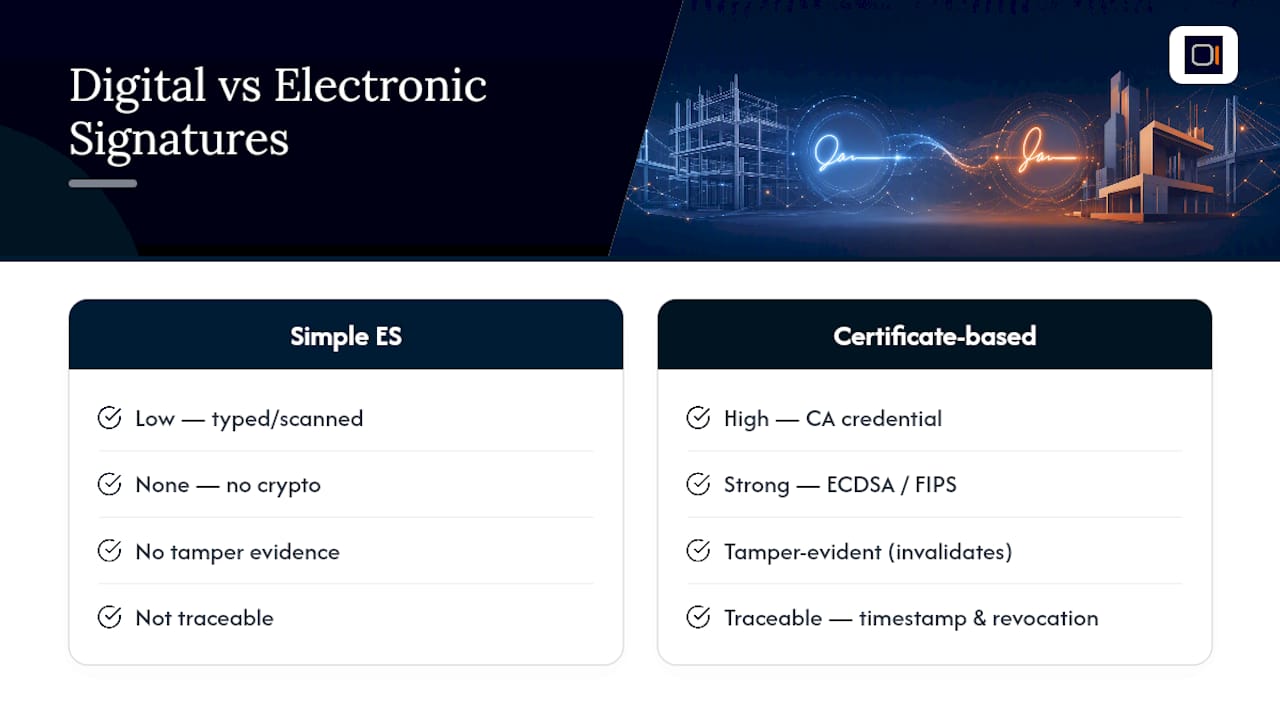
Certificate-based digital signatures and simple electronic signatures aren't interchangeable, even though engineers often use the terms loosely. A certificate-based digital signature relies on a third-party certificate authority (CA) that issues a credential tied to your identity, creating a verifiable chain of trust that a reviewer or auditor can check independently. A simple electronic signature, by contrast, might be nothing more than a typed name, a scanned image, or a basic authentication code with no cryptographic backing.
Statistic Callout: NIST's FIPS 186-5 standard defines the technical requirements for secure digital signatures, including ECDSA algorithms and per-message secret number generation, which are the building blocks that make a signature verifiable years after it's applied. RFC 6979 documents deterministic methods for generating those signatures, addressing a known weak point: poor random number generation can quietly undermine an otherwise sound cryptographic scheme.
For AHJs, verifiability is the deciding factor. Reviewers generally want a signature that's unique to the individual signer, tampered evident (any change to the file after signing invalidates it), and traceable through revocation and timestamp information. Trade coverage of digital adoption in the AEC sector notes that AHJs increasingly favor third-party CA credentials for exactly this reason. A typed name in a PDF field doesn't meet that bar. A CA-issued certificate does.
How Do You Build a Permit-Ready E-Signed Calculation Package?
Getting a multi-page calculation report through plan check without a rejection comes down to sequencing. Follow these steps in order:
- Assemble the report. Confirm the code basis, load combinations, and governing utilizations are clearly stated, with conclusions that a reviewer can find without hunting through appendices.
- Build the cover or index page. List the contents (calculation names and page counts), identify the signer and license number, and add a short certification statement covering the enclosed calculations.
- Apply the signature. Sign the cover or index page with a certificate-based digital signature if your AHJ accepts single-file signing; sign every sheet if it doesn't.
- Convert and verify format. Save as PDF/A if the AHJ requests an archival profile, and confirm the file opens cleanly with the signature intact.
- Submit with supporting documentation. Attach any signer verification files or delegated-engineer approval letters the portal requires, then retain the audit log and signed certificate metadata for your own records.
Pro Tip: A single digital signature on the cover page of a combined PDF is often accepted, but "often" isn't "always." Confirm your specific AHJ recognizes single-file signing before you build your entire workflow around it.
This sequence lines up closely with the plan-check habits covered in avoiding rework through peer review: reviewers want the same information organized the same way, every time.
What Tools and Credentials Do You Need to E-Sign Calculations?
Three categories of signing solutions cover almost every engineer's needs, and picking the right one depends on your firm's volume and risk tolerance.
- CA-issued signer certificates. A certificate authority verifies your identity and issues a credential you install in your signing software, giving you full control over each signature.
- Enterprise signing platforms. These handle identity vetting, key storage, and multi-signer workflows for firms that need several engineers signing documents under one managed system.
- PDF tools with certificate-signature support. Standard PDF editors that accept a CA-issued certificate let smaller firms sign without a full platform subscription.
Whichever category you choose, enforce the same operational controls: verify identity vetting meets your state's standards, protect your private key (never share the credential file or its password), apply timestamping so the signature date is independently verifiable, and retain the signed certificate metadata for every project.
Cost models split into per-signature fees, which suit firms that sign infrequently, and flat subscriptions, which make more sense once you're signing dozens of reports a month. The right choice depends on your submission volume more than the sticker price.
Should You Convert Structural Calculations to PDF/A Before Signing?
Convert to PDF/A before signing whenever your AHJ or internal recordkeeping policy calls for a long-term archival format. PDF/A lock in fonts, color profiles, and document structure so the file renders identically decades from now, which matters if a calculation report gets pulled into a dispute or an audit years after the project closes.
One detail catches engineers off guard: a printed copy of a digitally signed document is not the same as the signed original. Printing strips out the cryptographic verification entirely, so the printed page is just a visual reference, not proof of anything. The electronic file is the authoritative record, always.
Build your retention practice around three things: the signed PDF itself, the certificate metadata (signer chain and timestamp), and an internal approval index or email trail showing responsible-charge review. Auditors and disputes tend to ask for exactly this trio.
How Do California DSA and Miami-Dade Handle E-Signed Calculations?
These two jurisdictions illustrate the range of rules you'll run into nationwide, and both are worth bookmarking as reference checklists.
- California DSA (IR A-19): Cover sheet needs the stamp, signature, date, and license number. Drawings and calculations follow similar cover-sheet logic, though DSA's guidance focuses primarily on the stamp requirements rather than mandating per-sheet signing for calculations.
- Miami-Dade County: Drawings typically require separate per-sheet signed PDFs, while calculations can use a single signed cover or index page. Scanned copies of signed and sealed documents are rejected outright, and delegated-engineering submittals often rely on an index or approval letter rather than duplicate signatures on every sheet.
Confirm the exact portal rules before you submit, and when delegation is involved, include a signed approval letter alongside your index. That single document heads off most delegation-related plan-check comments, a pattern also covered in common California structural drawing omissions.
A Practitioner's Take on E-Signing Structural Work
E-signing cuts real time out of the review cycle. No printing, no courier, no chasing a wet stamp before a submittal deadline. But the inconsistency across AHJs is the part that trips up firms that skip process discipline.
Build a one-page AHJ rule reference and a standard signing template for your firm, and keep both updated as jurisdictions change their portal requirements. That small investment prevents far more rework than any signing tool by itself.
— Evalin
A Workflow That Fits Your E-Signing Process
Getting to a clean signature is only half the job. The report underneath it has to be organized enough that a reviewer can verify your load combinations, hold-down forces, and story drift checks without digging through inconsistent formatting. This kind of reviewer-ready PDF is built for 1- and 2-story wood-framed projects.
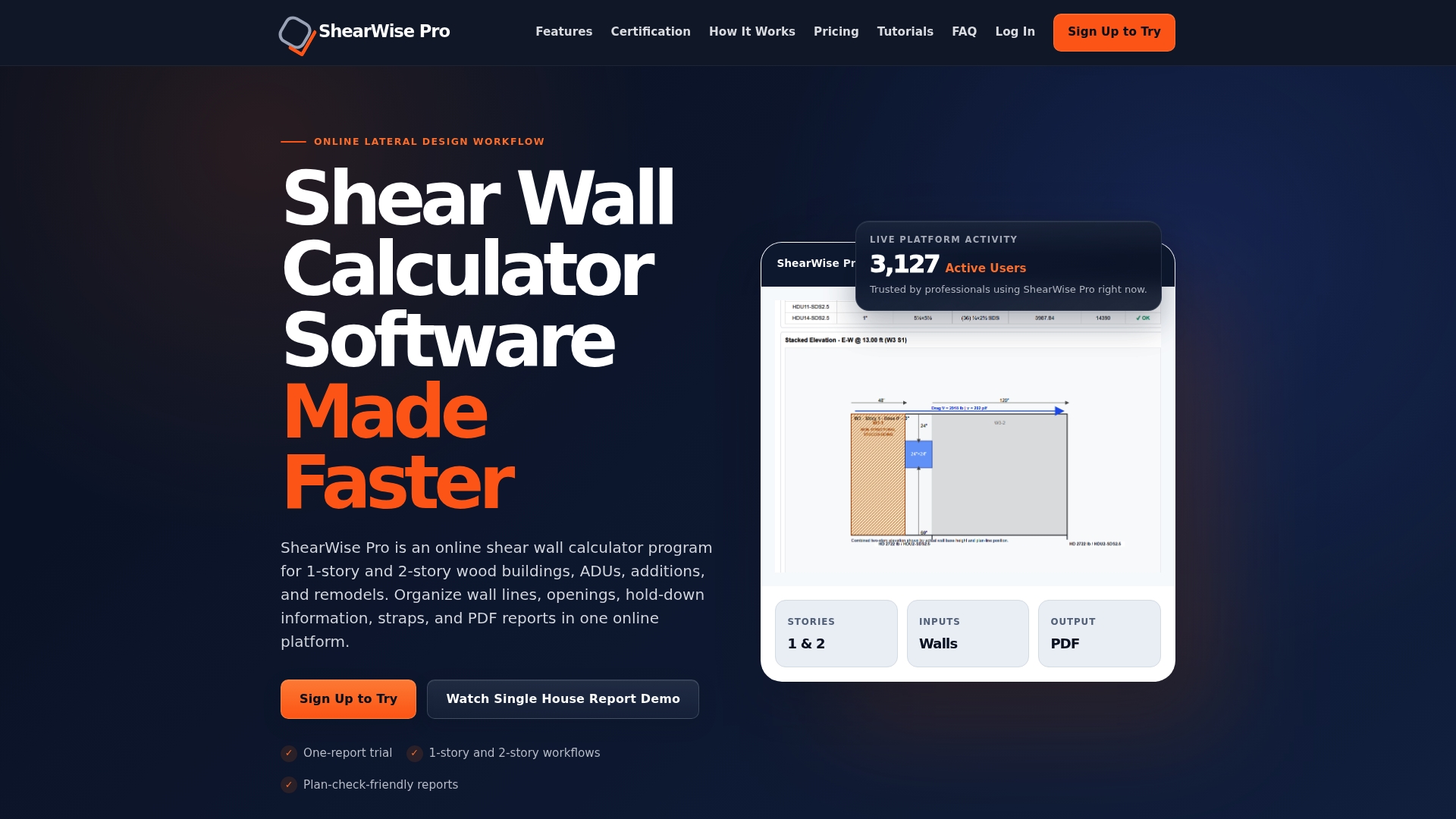
Instead of assembling shear wall calculations, wall lines, openings, and transfer strap data by hand across scattered spreadsheets, the software organizes it all into a single clean report that's ready for a cover-page signature and straight submission. That structure matters more than it sounds: a well-organized package is exactly what cuts down the plan-check comments discussed in streamlined plan review submittals. Every construction detail also needs to hold up under real code confidence once it reaches the field, a point echoed in this guidance on quality craftsmanship and code confidence.
Try it with the three-report trial, or check the Professional Monthly and Professional Annual plans if you're ready to build your next report today.
Sources
- FIPS 186-5: Digital Signature Standard (DSS)
- IR A-19: Design Professional Stamp (Seal) and Signature on Documents (Division of the State Architect)
- Miami‑Dade County — Digital signing and sealing guidance
- Digital Signatures in the Age of Electronic Plan Submissions — Structure Magazine
- Signing and Sealing of Documents—Electronic Seal & Signature — NSPE
FAQ
Are Electronic Signatures Legal for Structural Calculations in the U.S.?
Yes, electronic and digital signatures are legal for structural calculation reports in most U.S. jurisdictions, provided the method is verifiable and meets your state licensing board's requirements. The NSPE's ethics guidance confirms electronic sealing can be ethically sound as long as engineers follow their jurisdiction's specific rules.
What Software Is Best for Structural Calculations?
The right software depends on your project type. For 1- and 2-story wood-framed buildings specifically, some online platforms organize shear wall calculations, hold-down forces, and drift checks into clean, reviewer-ready PDF reports built for that scope.
How Much Does E-Signing Cost?
E-signing costs vary by tool category, ranging from per-signature fees for occasional use to flat subscriptions for firms signing frequently. ShearWise Pro itself starts with a free three-report trial, then moves to $29 per month or $250 per year for full access.
Do I Need a Certificate-Based Signature or Is a Simple E-Signature Enough?
Most AHJs prefer certificate-based digital signatures because they're tamper evident and independently verifiable, unlike a typed name or basic electronic mark. Check your specific AHJ's portal instructions, since acceptance criteria for simple electronic signatures still vary by jurisdiction.
Can I Sign a Multi-Page Calculation Report on Just the Cover Page?
Often, yes. Many AHJs, including Miami-Dade for calculation submittals, accept a single certificate-based signature on the cover or index page rather than requiring a signature on every sheet. Always confirm this practice is accepted by your specific AHJ before you submit.